What to Give AI Before Asking It to Write Product Descriptions
By Pedro Kroeff ·
TL;DR
Ask ChatGPT or Claude to "write a product description for this dress" and it writes a description of a typical dress, filling anything you didn't tell it with the most common answer: cotton, machine wash, true to size. A short brief you reuse for every product solves most of it. The brief has four parts: the verified facts for this one item (from the tag, the invoice, and your own tape measure), two or three descriptions you've already written so it can copy your voice, formatting rules for length and layout, and a list of claims it's never allowed to make. Then add one instruction telling it to write [MISSING: ...] when a fact isn't there instead of guessing. Ohavah helps with the facts half by reading your supplier invoice into listings with the right titles, variants, SKUs, and tags, so the details you hand the AI start out correct.
Most of us start with the same prompt. A new rust-colored wrap dress comes in, you paste the vendor's style name and maybe a photo into ChatGPT, and you type "write a product description for my boutique." Ten seconds later you have three polished paragraphs about a flowy, breathable dress that's perfect for brunch or a night out, runs true to size, and is easy to care for.
It reads well, and most of it is made up. The model has no idea what the dress is made of or how it fits, so it wrote the description of an average wrap dress and handed it over with the same confidence it would have if you'd given it the tag. When the dress turns out to be a rayon blend that's hand wash only and runs a size small, you're the one answering the return email.
A short brief you write once fixes most of this, and it has four parts.
Part 1: The product facts, and where each one came from
This is the only part of the brief that changes from product to product. Write down what you know about the item and where you learned it. A short list is plenty:
- Fiber content and care from the sewn-in tag, copied exactly. "60% rayon, 40% polyester. Hand wash cold, lay flat to dry."
- Measurements you took yourself on a sample: length from the shoulder, bust measured flat, inseam for pants. Note which size you measured.
- Fit notes from someone who tried it on. "Runs about a size small through the bust; our associate who normally wears a medium needed a large."
- Construction details a shopper can't see in a photo, like whether it's lined, sheer in bright light, has working buttons or decorative ones, pockets, or stretch.
- Style, color, and sizes from the invoice or line sheet, with your own color name if you rename the vendor's.
Noting the source makes the result quick to check. If the description says "machine washable" and your facts say the tag reads "hand wash cold," you know the model invented it. It also separates what you know from what you're assuming because the last dress from this vendor fit a certain way.
Leave a detail blank rather than guessing at it yourself. If nobody's tried the dress on yet, don't write a fit note, because the model treats everything in the brief as true and your guess will show up on the product page as a stated fact.
Part 2: Two or three descriptions you already like
Telling a model your voice is "fun, warm, and approachable" gets you the same copy every other store gets, because those words describe half the boutiques online. Paste in examples instead: two or three descriptions from your own site that sound like you, ideally for pieces that sold well, labeled as examples of tone and structure only. Without that label, models tend to borrow details from the examples, and your new dress inherits the "and yes, it has pockets" line from the jumpsuit you used as a sample. "These are examples of our voice. Don't reuse any product details from them" fixes most of it.
If you don't have descriptions you're proud of yet, write one by hand the way you'd describe the piece to a regular who walked in, and use that as your example, since one description in your own words will steer the model further than any list of adjectives.
Part 3: Formatting rules
These are the house rules you'd give a new employee writing listings, and they're why every page on your site ends up looking like it came from the same store. Be specific:
- Length, such as "about 60 to 90 words, then the details list."
- Layout, such as "a sentence or two on what the piece is and when you'd wear it, then bullets for fabric, care, fit, and measurements."
- Words you use and words you don't. Maybe you say "tunic" and never "top," write sizes as XS to XL, or never use exclamation points.
- What to leave alone, like "don't write a title, we already have one" and "don't mention the price."
Keeping the bullets in the same order on every page helps a shopper comparing two dresses side by side, and it helps the AI shopping assistants that read your pages too. We covered that side of it in how to write product pages for the questions shoppers ask AI.
Part 4: Claims the AI is never allowed to make
Every boutique has a few phrases that cause trouble when they're wrong. Write them down once and include the list every time. Here's a starting point:
- "True to size" or any other fit claim that isn't in your fit notes.
- "Machine washable," "wrinkle-free," "won't pill," or any care or durability claim the tag doesn't make.
- Fiber claims like "100% cotton" or "silk" that aren't on the tag. Describing rayon as "silky" is fine; calling it silk isn't.
- "Sustainable," "eco-friendly," and "ethically made," unless the vendor has documented it. The FTC's Green Guides treat broad environmental claims as likely to mislead when there's nothing specific behind them, and "eco-friendly" on its own is the textbook example.
- Body claims like "slimming" or "flattering on every body," which you can't promise and some customers find off-putting.
- "Selling fast" or "almost gone" when it isn't.
Every time you catch the model writing something you'd never say, put it on the list so it doesn't come back on the next forty products.
Tell it to flag what's missing
Even with a good facts list, you'll miss things. The tag didn't list care instructions, or nobody measured the inseam. Left alone, the model fills that hole the same way it filled the whole description in the one-line version, with the most typical answer for a garment like this one.
So give it another option. Add an instruction like this:
Use only the facts listed under PRODUCT FACTS. If a shopper would expect a detail that isn't in the facts, write [MISSING: what's missing] where it would go instead of guessing. After the description, list every [MISSING] item, and list any sentence that says something not found in the facts.
The model is trying to hand back a complete-looking answer, and with this instruction a placeholder counts as complete, so it has a permitted way to say it doesn't know, and in practice it usually takes it. The second half, the list of unsupported sentences, catches the softer additions like "a closet staple you'll reach for every week." Nobody gave it that line, and now you can decide whether to keep it.
The instruction won't catch everything. Models still slip in an unprompted "breathable" or "lightweight" now and then, so before you publish, search the draft for brackets and read the fabric, care, and fit lines against your facts, which takes a minute or two per product.
Putting the brief together
Here's the whole thing in one piece. Everything above PRODUCT FACTS stays the same for every product, so each new item only needs the bottom section filled in.
You write product descriptions for [store name], a boutique in [town].

OUR VOICE
These are examples of how we write. Match the tone and structure.
Don't reuse any product details from them.
[example description 1]
[example description 2]

FORMAT
- 60 to 90 words, then bullets: Fabric, Care, Fit, Measurements.
- Open with what the piece is and when you'd wear it.
- No title, no price, no exclamation points.

NEVER SAY
- "True to size" or any fit claim not in the fit notes
- Care or durability claims that aren't on the tag
- Fiber content that isn't on the tag
- Sustainable, eco-friendly, ethically made
- Slimming, flattering on every body

MISSING INFORMATION
Use only the facts under PRODUCT FACTS. If a shopper would expect a
detail that isn't there, write [MISSING: what's missing] instead of
guessing. After the description, list every [MISSING] item and any
sentence that says something not found in the facts.

PRODUCT FACTS
Style / color / sizes (from invoice):
Fiber and care (from tag):
Measurements (measured on size __):
Fit notes (tried on by __, who usually wears __):
Construction (lining, closures, sheerness, pockets, stretch):
ChatGPT and Claude both let you save instructions to a project, so you can store the top section there and paste in only the facts for each new item. Keep a copy in a plain document you own as well, because you'll keep editing the never-say list and the examples, and you don't want that work stuck inside one tool.
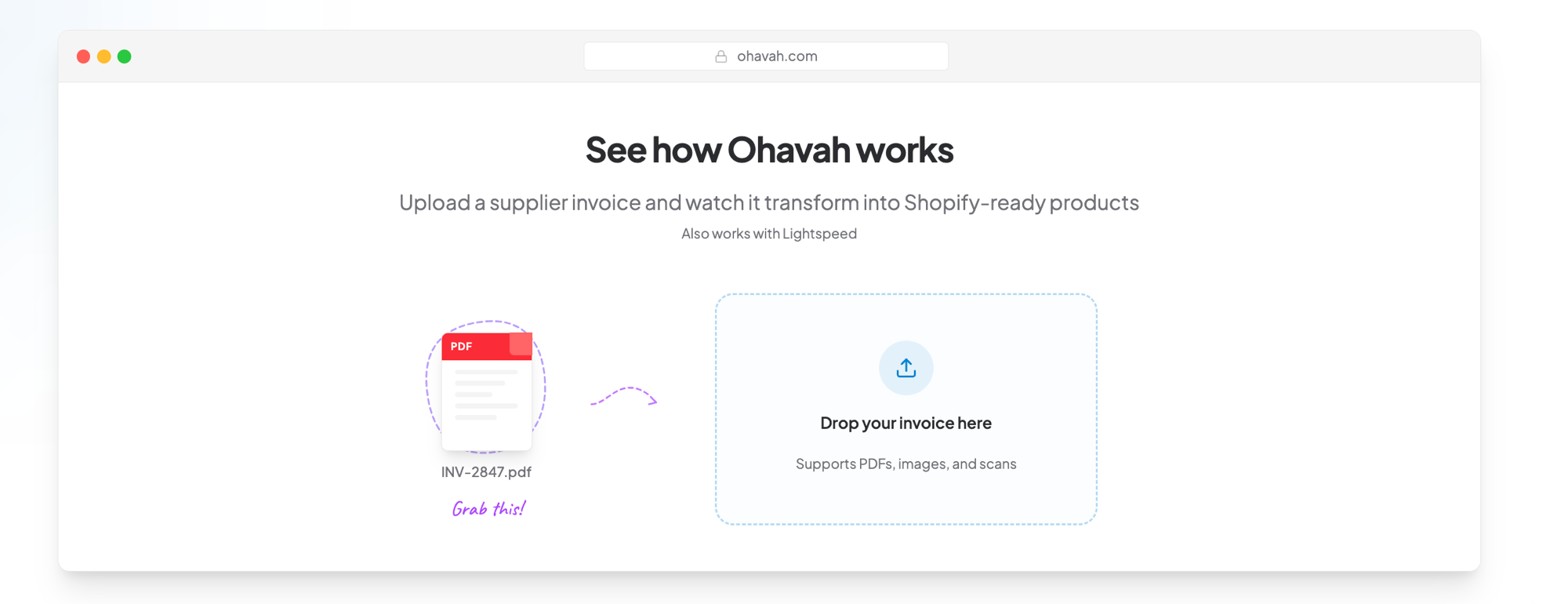
Start every brief from facts that already match the invoice
Ohavah turns your supplier invoice into ready-to-import listings, with titles, every size and color, SKUs, and tags filled in from the order, so the product facts you hand an AI start out correct.
 Lacy · Willowmere BoutiqueCalled it “an absolute game changer” for launching her new website.See Lacy’s story →
Most of the time goes into gathering the facts
Once the brief exists, writing descriptions with it goes quickly. What eats the afternoon is the facts block for every style in a delivery: pulling style names, colors, and sizes off the invoice and matching each style to its tag before anyone writes a word of copy.
Ohavah handles the invoice side of that. Upload the supplier invoice and it builds the listings, with titles, every size and color variant, SKUs, and tags filled in from the order. Reading tags and measuring samples are still on you, but the AI starts from listings whose basic facts already match the invoice. We wrote more on keeping AI from inventing details about your garments.
The first version of the brief takes about an hour, most of it spent choosing examples and writing the never-say list. After that, each product is a few lines of facts and a two-minute check, and the descriptions on your site match the clothes on your racks.
Try Ohavah free and start your next delivery from listings built off the invoice.
Related next steps
LacyWillowmere BoutiqueCalled it “an absolute game changer” for launching her new website.